

Overview
Phone Swap is a call attribution feature that dynamically replaces phone numbers on your website based on the visitor’s traffic source. When a visitor arrives from a specific campaign — Google Ads, Facebook, a partner referral, or any UTM-tagged link — the tracker automatically swaps your default phone number with a dedicated tracking number. When the visitor calls that number, you know exactly which campaign drove the call.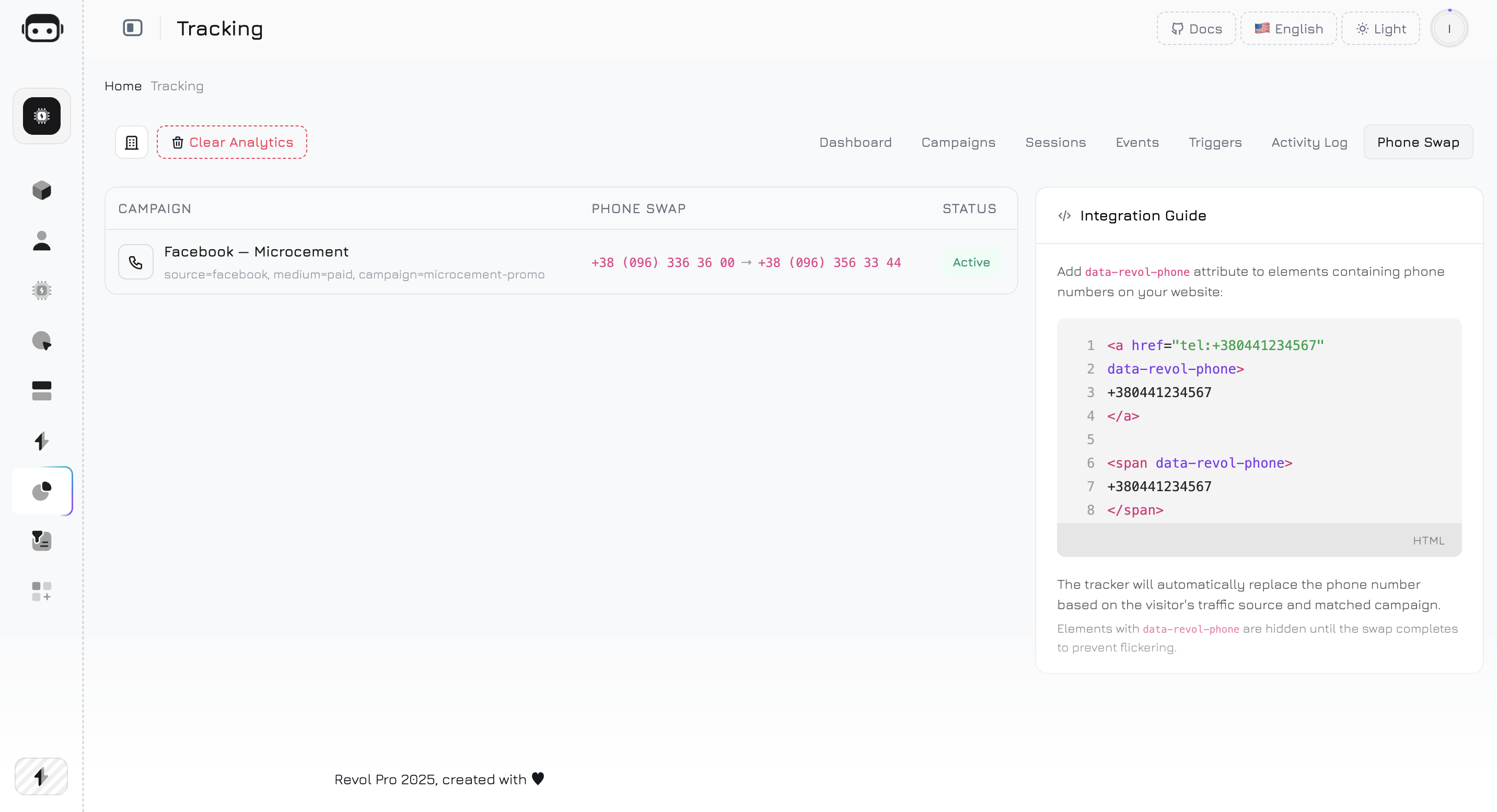
How It Works
1
Configure phone swap in a campaign
Open a campaign and set the Original Phone (the number on your website) and the Replacement Phone (a tracking number assigned to this campaign). See Campaigns — Phone Swap for setup details.
2
Visitor lands on your site
A visitor clicks your campaign link (with UTM parameters) and the tracker script loads. The tracker fetches the active phone swap rules from the server.
3
UTM matching
The tracker checks the visitor’s UTM parameters against each rule. All non-null match fields (utm_source, utm_medium, utm_campaign, rvl_ref) must match exactly. The first matching rule wins.
4
Number is replaced
The tracker finds all instances of the original phone number on the page — in
tel: links, in text with the data-revol-phone attribute — and replaces them with the tracking number. The replacement preserves the original number’s formatting.5
Event is recorded
A
phone_swap event is recorded with the original and replacement numbers. This event appears in the Activity Log and Campaign Performance table.6
Visitor calls
The visitor calls the tracking number. You see the call attributed to the specific campaign — no guesswork needed.
Phone Swap Tab
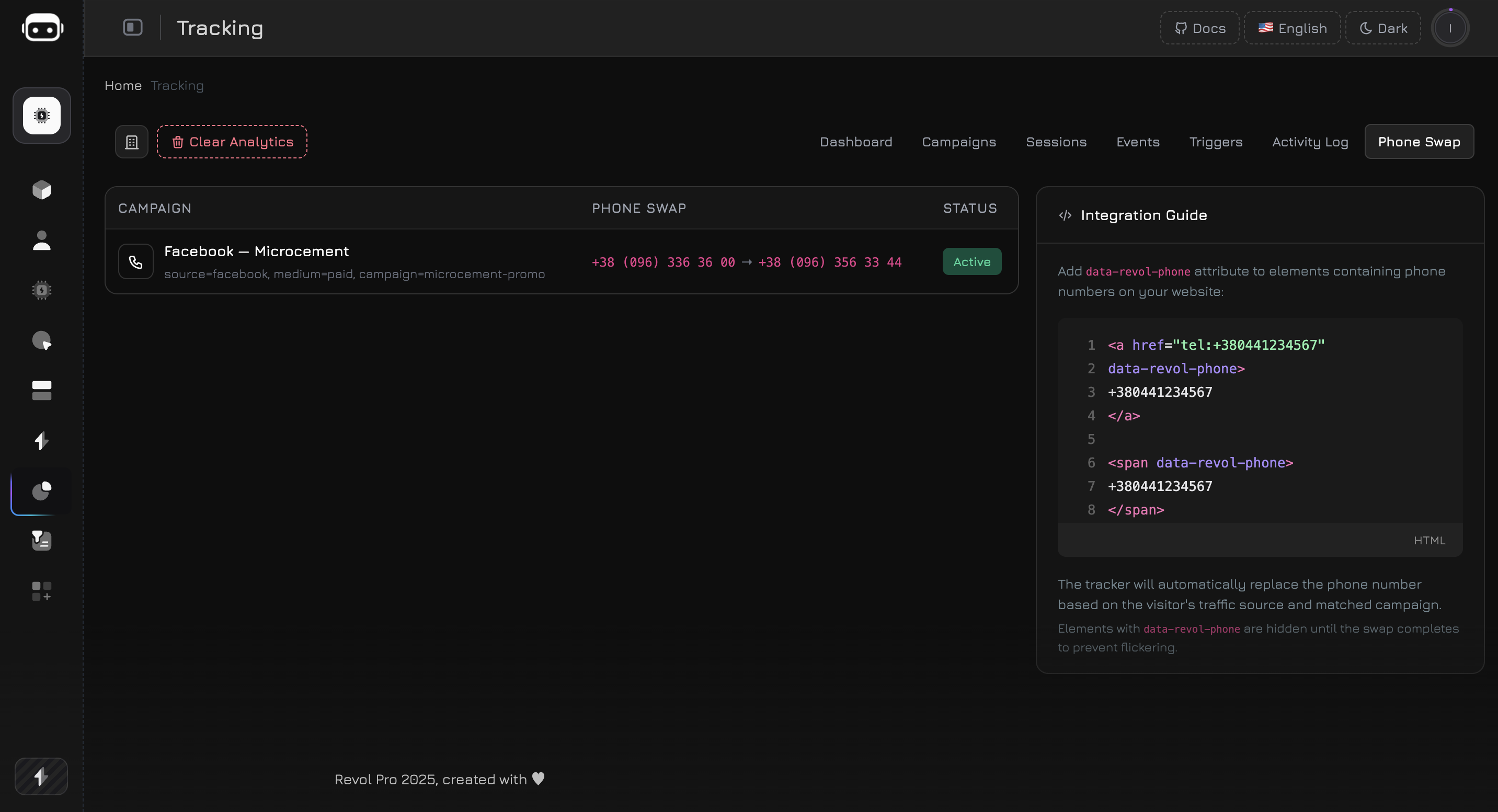
The Phone Swap tab shows all active phone swap rules from your campaigns in a single table:
This tab is a read-only summary — to add or edit phone swap rules, open the campaign in the Campaigns tab and configure the Phone Swap section.
Adding Phone Numbers to Your Website
The tracker replaces phone numbers in two ways:1. Tel Links (Automatic)
Any<a href="tel:..."> link on your page is automatically detected. If the href matches the original number from a rule, it’s swapped — both the href attribute and the visible text.
tel: links automatically.
2. Data Attribute (Explicit)
For phone numbers that are not intel: links (plain text, spans, divs), add the data-revol-phone attribute:
data-revol-phone are hidden (visibility: hidden) until the swap completes, preventing a flash of the original number.
Format Preservation
The tracker preserves the original number’s formatting when replacing. If the original and replacement have the same number of digits, the replacement is formatted using the original’s pattern:
If the digit counts differ, the replacement is inserted as-is without formatting.
SPA Support
The phone swap module uses a MutationObserver to watch for dynamically added elements. If your website is built with React, Vue, Angular, or any framework that renders content after page load — the tracker detects new phone elements as they appear in the DOM and swaps them automatically. The observer watches the entire document body for:- New
<a href="tel:...">links - New elements with
data-revol-phoneattribute
Matching Rules
Phone swap rules are derived from campaigns. Each campaign with both Original Phone and Replacement Phone set creates a rule.How Matching Works
The tracker checks the visitor’s UTM parameters against the rule’s match fields. All non-null fields must match exactly (AND logic):utm_source set but utm_medium is empty — only the source needs to match. Empty fields are ignored in matching.
Priority
If multiple campaigns match a visitor’s UTM parameters, the first matching rule is used. Rules are returned in creation order.Phone Swap Events
Each phone swap generates aphone_swap event, tracked once per visitor session. The event contains:
- Activity Log — as a
phone_swapevent type with the from/to data - Campaign Performance table — in the Phone Swaps column
- Session details — in the event timeline of the visitor’s session
Use Cases
Google Ads call tracking
Google Ads call tracking
Create a campaign with
utm_source=google, utm_medium=cpc. Set the original phone to your main business number and the replacement to a dedicated tracking number. Every call from Google Ads visitors is attributed to this campaign.Result: You see exactly how many calls your Google Ads spend generates — in the same dashboard as chat conversations, form submissions, and page views.Multi-channel attribution
Multi-channel attribution
Create separate campaigns for each traffic source — Google, Facebook, Instagram, email newsletter — each with its own tracking number. The same original number on your site is replaced differently depending on where the visitor came from.
Offline marketing (print, billboards)
Offline marketing (print, billboards)
Create a campaign for your print ads with a unique
rvl_ref parameter. Add a dedicated phone number. When someone calls the number from the flyer — you know it came from print, not digital. Combine with a QR code for digital tracking of the same material.Partner and referral tracking
Partner and referral tracking
Give each referral partner their own campaign with
rvl_ref=partner_name and a dedicated tracking number. Track exactly how many calls each partner generates — alongside sessions, page views, and AI conversations.A/B testing landing pages
A/B testing landing pages
Create two campaigns with the same source but different
utm_content values (e.g., landing-v1 vs landing-v2), each with a different tracking number. Compare call volumes between landing page variants.SIP Integration
Phone Swap becomes significantly more powerful when combined with SIP (VoIP) number integration. When you use SIP tracking numbers as replacements, the entire call lifecycle is captured inside Revol:1
Visitor sees the SIP tracking number
The tracker swaps your original number with a SIP-connected tracking number for visitors from a specific campaign.
2
Visitor calls the SIP number
The call is routed through your VoIP provider (Binotel, Twilio, etc.) and connected to your team.
3
Call is recorded and analyzed
With a VoIP integration active, the call is recorded, transcribed, and linked to the visitor’s session. You see the full journey: which ad they clicked, which pages they viewed, and what they said on the call.
4
AI analyzes the conversation
If your AI agent is configured for the integration channel, it can analyze the call transcript — identify the visitor’s intent, extract lead data, score the call quality, and even suggest follow-up actions.
What You Get
With Phone Swap + SIP integration combined, you have a complete call attribution pipeline:Best Practices
Use dedicated numbers per campaign
Use dedicated numbers per campaign
Don’t reuse the same tracking number across multiple campaigns — it defeats the purpose of attribution. Each campaign should have a unique replacement number.
Add data-revol-phone to all phone elements
Add data-revol-phone to all phone elements
Even if you use
tel: links (which are detected automatically), adding data-revol-phone prevents any flickering of the original number before the swap completes.Keep the original number consistent
Keep the original number consistent
Use the same original phone number across all campaigns. The tracker searches for this exact number on the page — if your website shows different phone numbers in different sections, create separate swap rules for each.
Test with UTM parameters
Test with UTM parameters
After setting up a phone swap rule, visit your site with the matching UTM parameters (e.g.,
?utm_source=google&utm_medium=cpc) and verify that the number changes. Check the Activity Log for the phone_swap event.