> ## Documentation Index
> Fetch the complete documentation index at: https://revolai.mintlify.site/llms.txt
> Use this file to discover all available pages before exploring further.
# Phone Swap
> Dynamic phone number replacement for call attribution — track which campaigns, ads, and traffic sources generate phone calls
## Overview
Phone Swap is a **call attribution** feature that dynamically replaces phone numbers on your website based on the visitor's traffic source. When a visitor arrives from a specific campaign — Google Ads, Facebook, a partner referral, or any UTM-tagged link — the tracker automatically swaps your default phone number with a dedicated tracking number. When the visitor calls that number, you know exactly which campaign drove the call.
 ***
## How It Works
Open a campaign and set the **Original Phone** (the number on your website) and the **Replacement Phone** (a tracking number assigned to this campaign). See [Campaigns — Phone Swap](/widget/campaigns#phone-swap) for setup details.
A visitor clicks your campaign link (with UTM parameters) and the tracker script loads. The tracker fetches the active phone swap rules from the server.
The tracker checks the visitor's UTM parameters against each rule. All non-null match fields (utm\_source, utm\_medium, utm\_campaign, rvl\_ref) must match exactly. The first matching rule wins.
The tracker finds all instances of the original phone number on the page — in `tel:` links, in text with the `data-revol-phone` attribute — and replaces them with the tracking number. The replacement preserves the original number's formatting.
A `phone_swap` event is recorded with the original and replacement numbers. This event appears in the Activity Log and Campaign Performance table.
The visitor calls the tracking number. You see the call attributed to the specific campaign — no guesswork needed.
***
## Phone Swap Tab
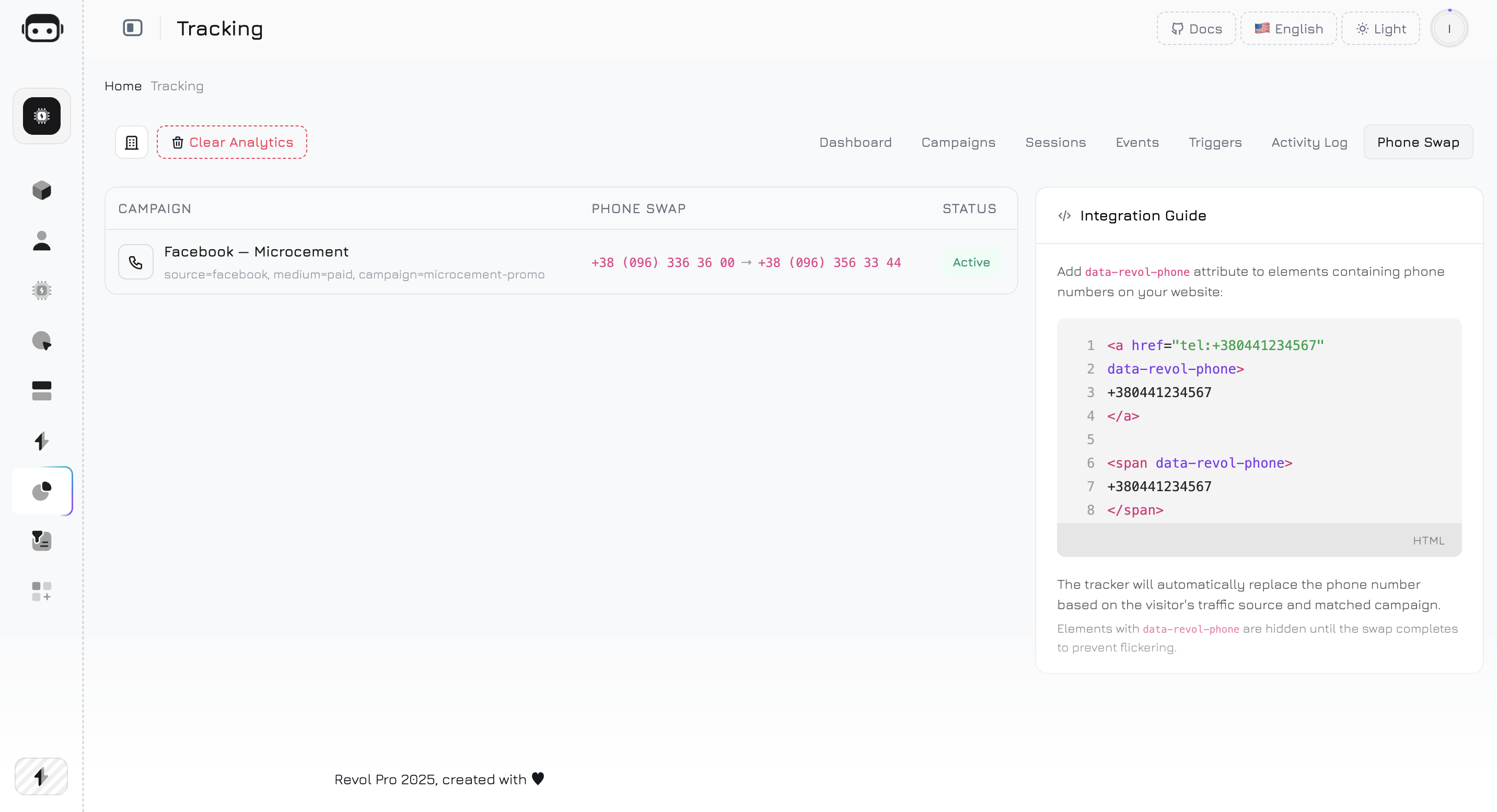
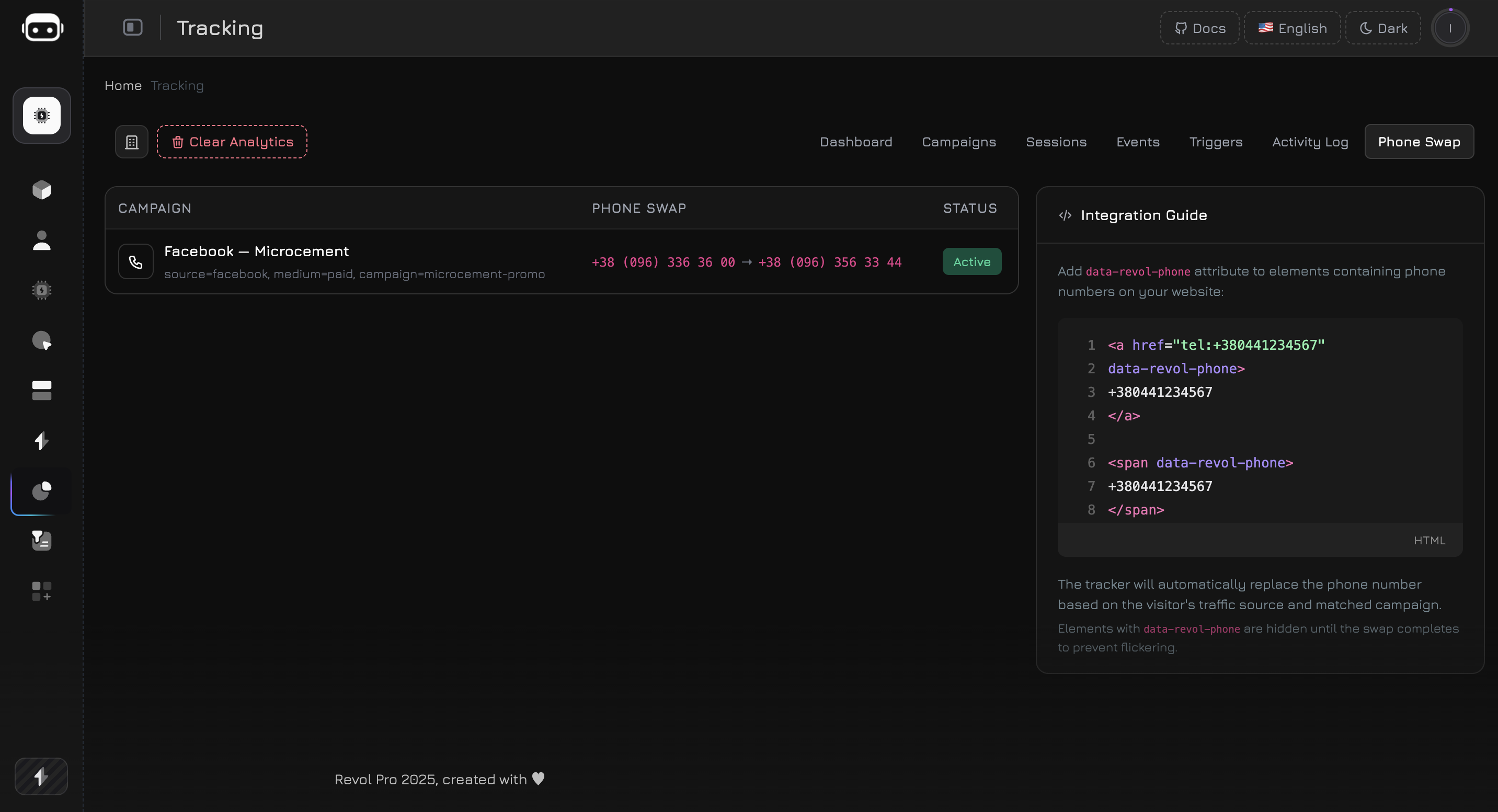
The Phone Swap tab shows all active phone swap rules from your campaigns in a single table:
| Column | Description |
| -------------- | ------------------------------------------------------------------------ |
| **Campaign** | Campaign name with UTM conditions (source, medium, etc.) displayed below |
| **Phone Swap** | Original number → Replacement number |
| **Status** | Active or inactive |
This tab is a **read-only summary** — to add or edit phone swap rules, open the campaign in the [Campaigns](/widget/campaigns) tab and configure the Phone Swap section.
***
## Adding Phone Numbers to Your Website
The tracker replaces phone numbers in two ways:
### 1. Tel Links (Automatic)
Any `` link on your page is automatically detected. If the href matches the original number from a rule, it's swapped — both the `href` attribute and the visible text.
```html theme={null}
+380 (44) 123-45-67
+380 (44) 987-65-43
```
No extra attributes needed — the tracker finds `tel:` links automatically.
### 2. Data Attribute (Explicit)
For phone numbers that are not in `tel:` links (plain text, spans, divs), add the `data-revol-phone` attribute:
```html theme={null}
+380441234567
***
## How It Works
Open a campaign and set the **Original Phone** (the number on your website) and the **Replacement Phone** (a tracking number assigned to this campaign). See [Campaigns — Phone Swap](/widget/campaigns#phone-swap) for setup details.
A visitor clicks your campaign link (with UTM parameters) and the tracker script loads. The tracker fetches the active phone swap rules from the server.
The tracker checks the visitor's UTM parameters against each rule. All non-null match fields (utm\_source, utm\_medium, utm\_campaign, rvl\_ref) must match exactly. The first matching rule wins.
The tracker finds all instances of the original phone number on the page — in `tel:` links, in text with the `data-revol-phone` attribute — and replaces them with the tracking number. The replacement preserves the original number's formatting.
A `phone_swap` event is recorded with the original and replacement numbers. This event appears in the Activity Log and Campaign Performance table.
The visitor calls the tracking number. You see the call attributed to the specific campaign — no guesswork needed.
***
## Phone Swap Tab
The Phone Swap tab shows all active phone swap rules from your campaigns in a single table:
| Column | Description |
| -------------- | ------------------------------------------------------------------------ |
| **Campaign** | Campaign name with UTM conditions (source, medium, etc.) displayed below |
| **Phone Swap** | Original number → Replacement number |
| **Status** | Active or inactive |
This tab is a **read-only summary** — to add or edit phone swap rules, open the campaign in the [Campaigns](/widget/campaigns) tab and configure the Phone Swap section.
***
## Adding Phone Numbers to Your Website
The tracker replaces phone numbers in two ways:
### 1. Tel Links (Automatic)
Any `` link on your page is automatically detected. If the href matches the original number from a rule, it's swapped — both the `href` attribute and the visible text.
```html theme={null}
+380 (44) 123-45-67
+380 (44) 987-65-43
```
No extra attributes needed — the tracker finds `tel:` links automatically.
### 2. Data Attribute (Explicit)
For phone numbers that are not in `tel:` links (plain text, spans, divs), add the `data-revol-phone` attribute:
```html theme={null}
+380441234567
+380 44 123 45 67
```
Elements with `data-revol-phone` are hidden (`visibility: hidden`) until the swap completes, preventing a flash of the original number.
Use `data-revol-phone` for all phone numbers you want to swap — even if they're inside `tel:` links. This gives the tracker explicit control and prevents any flickering.
***
## Format Preservation
The tracker preserves the original number's formatting when replacing. If the original and replacement have the same number of digits, the replacement is formatted using the original's pattern:
| Original | Replacement (raw) | Result |
| --------------------- | ----------------- | --------------------- |
| `+380 (44) 123-45-67` | `+380949876543` | `+380 (94) 987-65-43` |
| `044 123 45 67` | `0949876543` | `094 987 65 43` |
| `+380441234567` | `+380949876543` | `+380949876543` |
If the digit counts differ, the replacement is inserted as-is without formatting.
***
## SPA Support
The phone swap module uses a **MutationObserver** to watch for dynamically added elements. If your website is built with React, Vue, Angular, or any framework that renders content after page load — the tracker detects new phone elements as they appear in the DOM and swaps them automatically.
The observer watches the entire document body for:
* New `` links
* New elements with `data-revol-phone` attribute
The observer disconnects on page unload to prevent memory leaks.
***
## Matching Rules
Phone swap rules are derived from campaigns. Each campaign with both **Original Phone** and **Replacement Phone** set creates a rule.
### How Matching Works
The tracker checks the visitor's UTM parameters against the rule's match fields. **All non-null fields must match exactly** (AND logic):
```
Rule: { utm_source: "google", utm_medium: "cpc" }
✓ Visitor with utm_source=google, utm_medium=cpc → MATCH
✗ Visitor with utm_source=google, utm_medium=organic → NO MATCH
✗ Visitor with utm_source=facebook, utm_medium=cpc → NO MATCH
```
If a campaign has `utm_source` set but `utm_medium` is empty — only the source needs to match. Empty fields are ignored in matching.
### Priority
If multiple campaigns match a visitor's UTM parameters, the **first matching rule** is used. Rules are returned in creation order.
***
## Phone Swap Events
Each phone swap generates a `phone_swap` event, tracked once per visitor session. The event contains:
```json theme={null}
{
"from": "+380441234567",
"to": "+380949876543"
}
```
Phone swap events appear in:
* **Activity Log** — as a `phone_swap` event type with the from/to data
* **Campaign Performance** table — in the **Phone Swaps** column
* **Session details** — in the event timeline of the visitor's session
***
## Use Cases
Create a campaign with `utm_source=google`, `utm_medium=cpc`. Set the original phone to your main business number and the replacement to a dedicated tracking number. Every call from Google Ads visitors is attributed to this campaign.
**Result:** You see exactly how many calls your Google Ads spend generates — in the same dashboard as chat conversations, form submissions, and page views.
Create separate campaigns for each traffic source — Google, Facebook, Instagram, email newsletter — each with its own tracking number. The same original number on your site is replaced differently depending on where the visitor came from.
| Campaign | Source | Tracking Number |
| ------------ | ------------------ | ---------------- |
| Google Brand | google / cpc | +380 44 111 1111 |
| Facebook Ads | facebook / paid | +380 44 222 2222 |
| Newsletter | newsletter / email | +380 44 333 3333 |
| Organic | — (no swap) | Original number |
Create a campaign for your print ads with a unique `rvl_ref` parameter. Add a dedicated phone number. When someone calls the number from the flyer — you know it came from print, not digital. Combine with a [QR code](/widget/campaigns#qr-code) for digital tracking of the same material.
Give each referral partner their own campaign with `rvl_ref=partner_name` and a dedicated tracking number. Track exactly how many calls each partner generates — alongside sessions, page views, and AI conversations.
Create two campaigns with the same source but different `utm_content` values (e.g., `landing-v1` vs `landing-v2`), each with a different tracking number. Compare call volumes between landing page variants.
***
## SIP Integration
Phone Swap becomes significantly more powerful when combined with **SIP (VoIP) number integration**. When you use SIP tracking numbers as replacements, the entire call lifecycle is captured inside Revol:
The tracker swaps your original number with a SIP-connected tracking number for visitors from a specific campaign.
The call is routed through your VoIP provider (Binotel, Twilio, etc.) and connected to your team.
With a VoIP integration active, the call is recorded, transcribed, and linked to the visitor's session. You see the full journey: which ad they clicked, which pages they viewed, and what they said on the call.
If your AI agent is configured for the integration channel, it can analyze the call transcript — identify the visitor's intent, extract lead data, score the call quality, and even suggest follow-up actions.
### What You Get
With Phone Swap + SIP integration combined, you have a **complete call attribution pipeline**:
| Data Point | Source |
| ------------------------------------------------- | --------------------------------------- |
| **Which campaign** brought the visitor | UTM parameters → Campaign matching |
| **Which pages** the visitor viewed before calling | Session page flow |
| **How long** they spent on the site | Session duration |
| **What they said** on the call | VoIP call recording + transcription |
| **Lead quality** and intent | AI analysis of the call |
| **Which tracking number** they called | Phone swap event data |
| **Cost per call** (if ad spend is known) | Campaign attribution + ad platform data |
This creates a closed feedback loop: you see that a Google Ads click led to 3 page views, a 45-second browse, a phone call where the visitor asked about pricing, and the AI scored it as a high-intent lead — all in one session timeline.
***
## Best Practices
Don't reuse the same tracking number across multiple campaigns — it defeats the purpose of attribution. Each campaign should have a unique replacement number.
Even if you use `tel:` links (which are detected automatically), adding `data-revol-phone` prevents any flickering of the original number before the swap completes.
Use the same original phone number across all campaigns. The tracker searches for this exact number on the page — if your website shows different phone numbers in different sections, create separate swap rules for each.
After setting up a phone swap rule, visit your site with the matching UTM parameters (e.g., `?utm_source=google&utm_medium=cpc`) and verify that the number changes. Check the Activity Log for the `phone_swap` event.
***
## Technical Details
| Detail | Value |
| ------------------------- | ------------------------------------------------------------------- |
| **Module** | `tracker/modules/phone-swap.js` — lazy-loaded only when rules exist |
| **Matching** | Exact match on all non-null UTM fields (AND logic) |
| **Detection** | `` links + `[data-revol-phone]` elements |
| **SPA support** | MutationObserver on `document.body` (childList + subtree) |
| **Flickering prevention** | CSS `visibility: hidden` on `[data-revol-phone]` until swap |
| **Event tracking** | One `phone_swap` event per session (first swap only) |
| **Config refresh** | Every 5 minutes via background config polling |
| **Number normalization** | Strips spaces, dashes, parentheses, periods before comparison |