> ## Documentation Index
> Fetch the complete documentation index at: https://revolai.mintlify.site/llms.txt
> Use this file to discover all available pages before exploring further.
# Widget Customization
> Customize the appearance, behavior, and voice settings of your chat widget
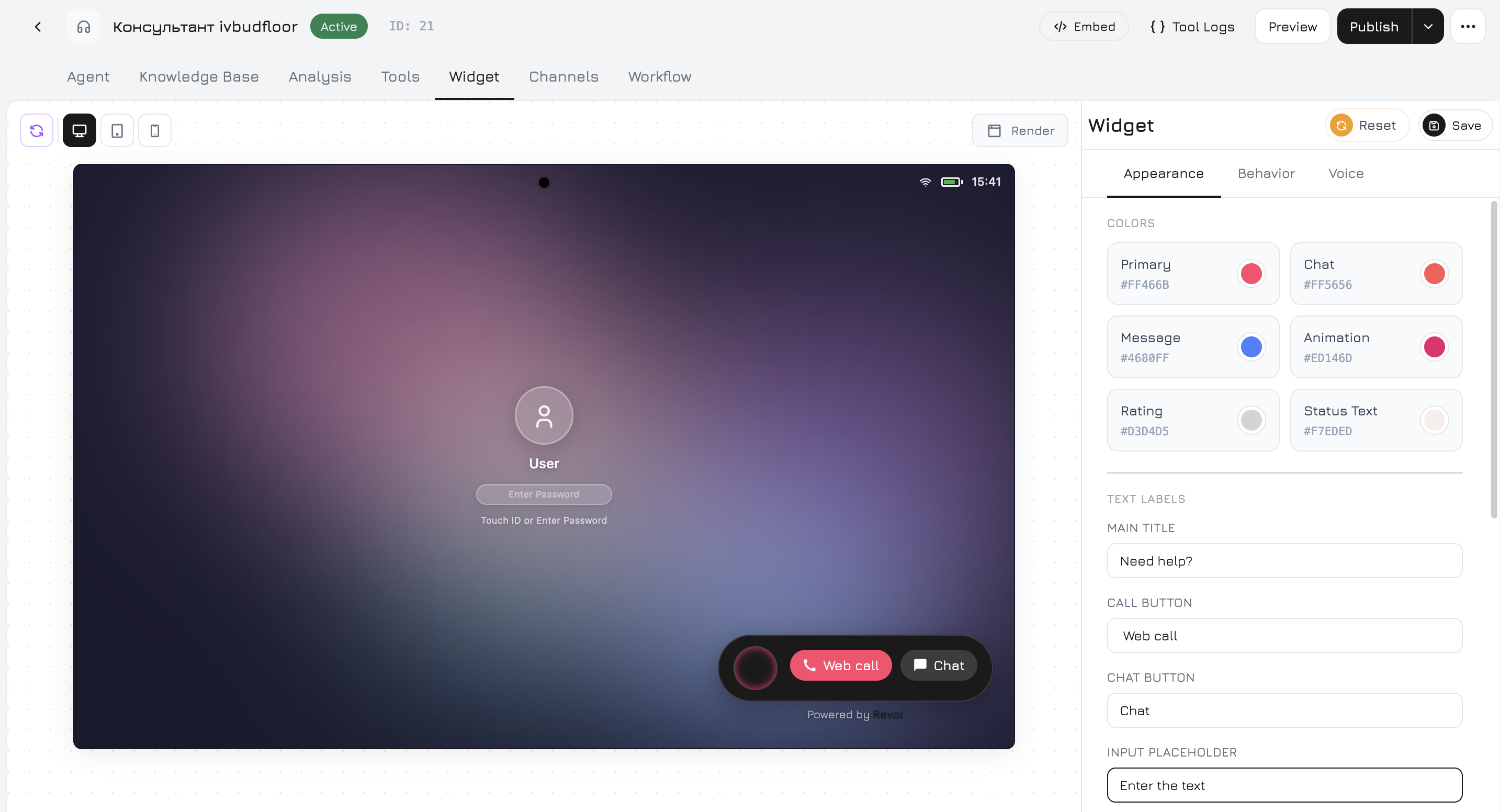
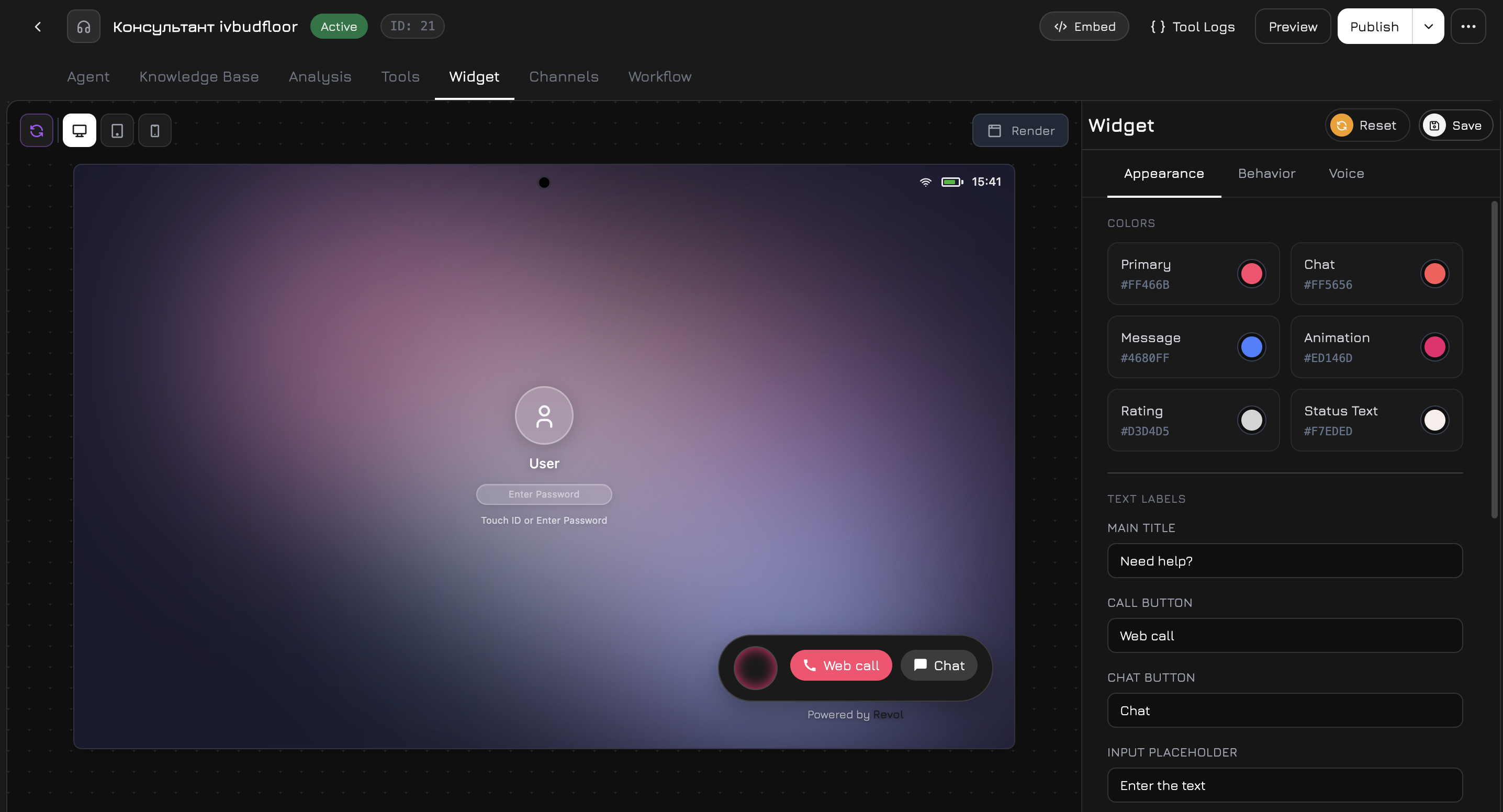
The Widget tab in the agent panel lets you fully customize how the chat widget looks and behaves on your website. All changes are previewed in real time.
 ## Render Button
The **Render** button in the widget preview area reloads the live preview of your widget with the current settings. Use it to see how your changes look before saving.
## Appearance
The Appearance tab controls the visual design of the widget.
### Colors
| Setting | Description |
| --------------- | -------------------------------------------------------- |
| **Primary** | Main button and accent color of the widget |
| **Chat** | Chat action button color |
| **Message** | Background color of the agent's message bubbles |
| **Animation** | Color of pulse and glow effects around the widget button |
| **Rating** | Color of the star rating icons after conversation |
| **Status Text** | Color of the status text on the widget button |
Click any color swatch to open the color picker with a saturation/hue selector and hex input.
### Text Labels
| Setting | Default | Description |
| --------------------- | ---------------- | ------------------------------------------- |
| **Main Title** | "Need help?" | Title displayed on the widget button |
| **Call Button** | "Web call" | Label on the voice call button |
| **Chat Button** | "Chat" | Label on the chat button |
| **Input Placeholder** | "Enter the text" | Placeholder text in the message input field |
### Position
| Option | Description |
| ----------------- | --------------------------------------------------- |
| **Bottom Right** | Default — widget appears in the bottom-right corner |
| **Bottom Center** | Centered at the bottom of the page |
| **Bottom Left** | Bottom-left corner |
| **Top Right** | Top-right corner |
| **Top Center** | Centered at the top |
| **Top Left** | Top-left corner |
### Size & Style
| Setting | Options | Description |
| ---------------------- | ---------------------- | --------------------------------------------- |
| **Widget Theme** | Light / Dark | Color theme of the chat window |
| **Widget Size** | Small / Medium / Large | Overall size of the widget |
| **Border Radius** | 0–50px (slider) | Corner roundness of the widget |
| **Background Opacity** | 0–100% (slider) | Transparency of the widget background |
| **Avatar URL** | URL | Custom avatar image for the agent in the chat |
## Behavior
The Behavior tab controls how the widget functions.
### Language
| Setting | Options | Description |
| ------------------- | --------------------------------------------- | ------------------------------------------------------------ |
| **Widget Language** | English, Українська, Polski, Deutsch, Español | Interface language for all widget labels and system messages |
### Features
| Setting | Default | Description |
| ----------------------- | ------- | ----------------------------------------------------------------- |
| **Feedback Collection** | On | Show a star rating prompt after the conversation ends |
| **Text During Call** | On | Allow the user to type text messages while a voice call is active |
| **Chat Only Mode** | Off | Disable voice calls entirely — only text chat is available |
| **Terms & Conditions** | Off | Require the user to accept terms before starting a chat |
| **Sound Effects** | On | Play notification sounds for new messages |
### Automation
| Setting | Default | Description |
| ------------------- | ------------------ | --------------------------------------------------------------------- |
| **Auto Open** | Off | Automatically open the widget after a delay |
| **Auto Open Delay** | 5s (slider, 0–60s) | How long to wait before auto-opening (only when Auto Open is enabled) |
| **Auto Greeting** | Off | Automatically send a greeting message when the widget opens |
### Visibility
| Setting | Default | Description |
| ------------------- | ------- | ------------------------------------------------------- |
| **Widget Enabled** | On | Master toggle — show or hide the widget on your website |
| **Show on Mobile** | On | Display the widget on mobile devices |
| **Show on Desktop** | On | Display the widget on desktop devices |
### Branding
| Setting | Default | Description |
| -------------------- | ------- | --------------------------------------------------------------------------------- |
| **Powered By Badge** | On | Show the "Powered by Revol" branding at the bottom of the widget |
| **Welcome Message** | — | A greeting message displayed when the chat opens (before the user sends anything) |
### Terms Details
When **Terms & Conditions** is enabled, these additional fields appear:
| Setting | Description |
| -------------- | ------------------------------------------------------------------------------------- |
| **Terms Text** | The text shown to the user (e.g., "By continuing, you agree to our Terms of Service") |
| **Terms URL** | Link to your full terms page |
## Voice
The Voice tab configures speech recognition and text-to-speech for voice calls.
### Speech Recognition (STT)
| Setting | Options | Description |
| ------------ | ------------------- | ----------------------------------------- |
| **Language** | Українська, English | Language for speech-to-text transcription |
### Greeting Message
The text that the agent speaks when answering a voice call. You can **Preview** the audio before saving and **Save** to apply it.
### Farewell Message
The text spoken when the call ends. Also has **Preview** and **Save** buttons.
### Voice Output (TTS)
| Setting | Options | Description |
| ------------ | --------------------------------------- | --------------------------------------------------------------------- |
| **Provider** | OpenAI TTS | Text-to-speech provider (ElevenLabs and Google Cloud TTS coming soon) |
| **Voice** | Alloy, Echo, Fable, Onyx, Nova, Shimmer | Voice character for the agent |
| **Model** | tts-1, tts-1-hd | Audio quality — standard or HD |
| **Speed** | 0.5x – 2.0x (slider) | Speech speed |
**Voice descriptions:**
| Voice | Character |
| ----------- | -------------------------- |
| **Alloy** | Neutral, balanced |
| **Echo** | Warm, conversational |
| **Fable** | Expressive, British accent |
| **Onyx** | Deep, authoritative |
| **Nova** | Friendly, optimistic |
| **Shimmer** | Clear, gentle |
### Test Voice
Enter any text and click **Play Test** to hear how the selected voice sounds with the current settings.
## Save & Reset
* **Save** — apply all changes to the widget
* **Reset** — revert all settings to their last saved state
## Render Button
The **Render** button in the widget preview area reloads the live preview of your widget with the current settings. Use it to see how your changes look before saving.
## Appearance
The Appearance tab controls the visual design of the widget.
### Colors
| Setting | Description |
| --------------- | -------------------------------------------------------- |
| **Primary** | Main button and accent color of the widget |
| **Chat** | Chat action button color |
| **Message** | Background color of the agent's message bubbles |
| **Animation** | Color of pulse and glow effects around the widget button |
| **Rating** | Color of the star rating icons after conversation |
| **Status Text** | Color of the status text on the widget button |
Click any color swatch to open the color picker with a saturation/hue selector and hex input.
### Text Labels
| Setting | Default | Description |
| --------------------- | ---------------- | ------------------------------------------- |
| **Main Title** | "Need help?" | Title displayed on the widget button |
| **Call Button** | "Web call" | Label on the voice call button |
| **Chat Button** | "Chat" | Label on the chat button |
| **Input Placeholder** | "Enter the text" | Placeholder text in the message input field |
### Position
| Option | Description |
| ----------------- | --------------------------------------------------- |
| **Bottom Right** | Default — widget appears in the bottom-right corner |
| **Bottom Center** | Centered at the bottom of the page |
| **Bottom Left** | Bottom-left corner |
| **Top Right** | Top-right corner |
| **Top Center** | Centered at the top |
| **Top Left** | Top-left corner |
### Size & Style
| Setting | Options | Description |
| ---------------------- | ---------------------- | --------------------------------------------- |
| **Widget Theme** | Light / Dark | Color theme of the chat window |
| **Widget Size** | Small / Medium / Large | Overall size of the widget |
| **Border Radius** | 0–50px (slider) | Corner roundness of the widget |
| **Background Opacity** | 0–100% (slider) | Transparency of the widget background |
| **Avatar URL** | URL | Custom avatar image for the agent in the chat |
## Behavior
The Behavior tab controls how the widget functions.
### Language
| Setting | Options | Description |
| ------------------- | --------------------------------------------- | ------------------------------------------------------------ |
| **Widget Language** | English, Українська, Polski, Deutsch, Español | Interface language for all widget labels and system messages |
### Features
| Setting | Default | Description |
| ----------------------- | ------- | ----------------------------------------------------------------- |
| **Feedback Collection** | On | Show a star rating prompt after the conversation ends |
| **Text During Call** | On | Allow the user to type text messages while a voice call is active |
| **Chat Only Mode** | Off | Disable voice calls entirely — only text chat is available |
| **Terms & Conditions** | Off | Require the user to accept terms before starting a chat |
| **Sound Effects** | On | Play notification sounds for new messages |
### Automation
| Setting | Default | Description |
| ------------------- | ------------------ | --------------------------------------------------------------------- |
| **Auto Open** | Off | Automatically open the widget after a delay |
| **Auto Open Delay** | 5s (slider, 0–60s) | How long to wait before auto-opening (only when Auto Open is enabled) |
| **Auto Greeting** | Off | Automatically send a greeting message when the widget opens |
### Visibility
| Setting | Default | Description |
| ------------------- | ------- | ------------------------------------------------------- |
| **Widget Enabled** | On | Master toggle — show or hide the widget on your website |
| **Show on Mobile** | On | Display the widget on mobile devices |
| **Show on Desktop** | On | Display the widget on desktop devices |
### Branding
| Setting | Default | Description |
| -------------------- | ------- | --------------------------------------------------------------------------------- |
| **Powered By Badge** | On | Show the "Powered by Revol" branding at the bottom of the widget |
| **Welcome Message** | — | A greeting message displayed when the chat opens (before the user sends anything) |
### Terms Details
When **Terms & Conditions** is enabled, these additional fields appear:
| Setting | Description |
| -------------- | ------------------------------------------------------------------------------------- |
| **Terms Text** | The text shown to the user (e.g., "By continuing, you agree to our Terms of Service") |
| **Terms URL** | Link to your full terms page |
## Voice
The Voice tab configures speech recognition and text-to-speech for voice calls.
### Speech Recognition (STT)
| Setting | Options | Description |
| ------------ | ------------------- | ----------------------------------------- |
| **Language** | Українська, English | Language for speech-to-text transcription |
### Greeting Message
The text that the agent speaks when answering a voice call. You can **Preview** the audio before saving and **Save** to apply it.
### Farewell Message
The text spoken when the call ends. Also has **Preview** and **Save** buttons.
### Voice Output (TTS)
| Setting | Options | Description |
| ------------ | --------------------------------------- | --------------------------------------------------------------------- |
| **Provider** | OpenAI TTS | Text-to-speech provider (ElevenLabs and Google Cloud TTS coming soon) |
| **Voice** | Alloy, Echo, Fable, Onyx, Nova, Shimmer | Voice character for the agent |
| **Model** | tts-1, tts-1-hd | Audio quality — standard or HD |
| **Speed** | 0.5x – 2.0x (slider) | Speech speed |
**Voice descriptions:**
| Voice | Character |
| ----------- | -------------------------- |
| **Alloy** | Neutral, balanced |
| **Echo** | Warm, conversational |
| **Fable** | Expressive, British accent |
| **Onyx** | Deep, authoritative |
| **Nova** | Friendly, optimistic |
| **Shimmer** | Clear, gentle |
### Test Voice
Enter any text and click **Play Test** to hear how the selected voice sounds with the current settings.
## Save & Reset
* **Save** — apply all changes to the widget
* **Reset** — revert all settings to their last saved state