> ## Documentation Index
> Fetch the complete documentation index at: https://revolai.mintlify.site/llms.txt
> Use this file to discover all available pages before exploring further.
# Activity Log
> Browse and filter raw tracking events — clicks, form submissions, triggers, and custom events with full data payloads
## Overview
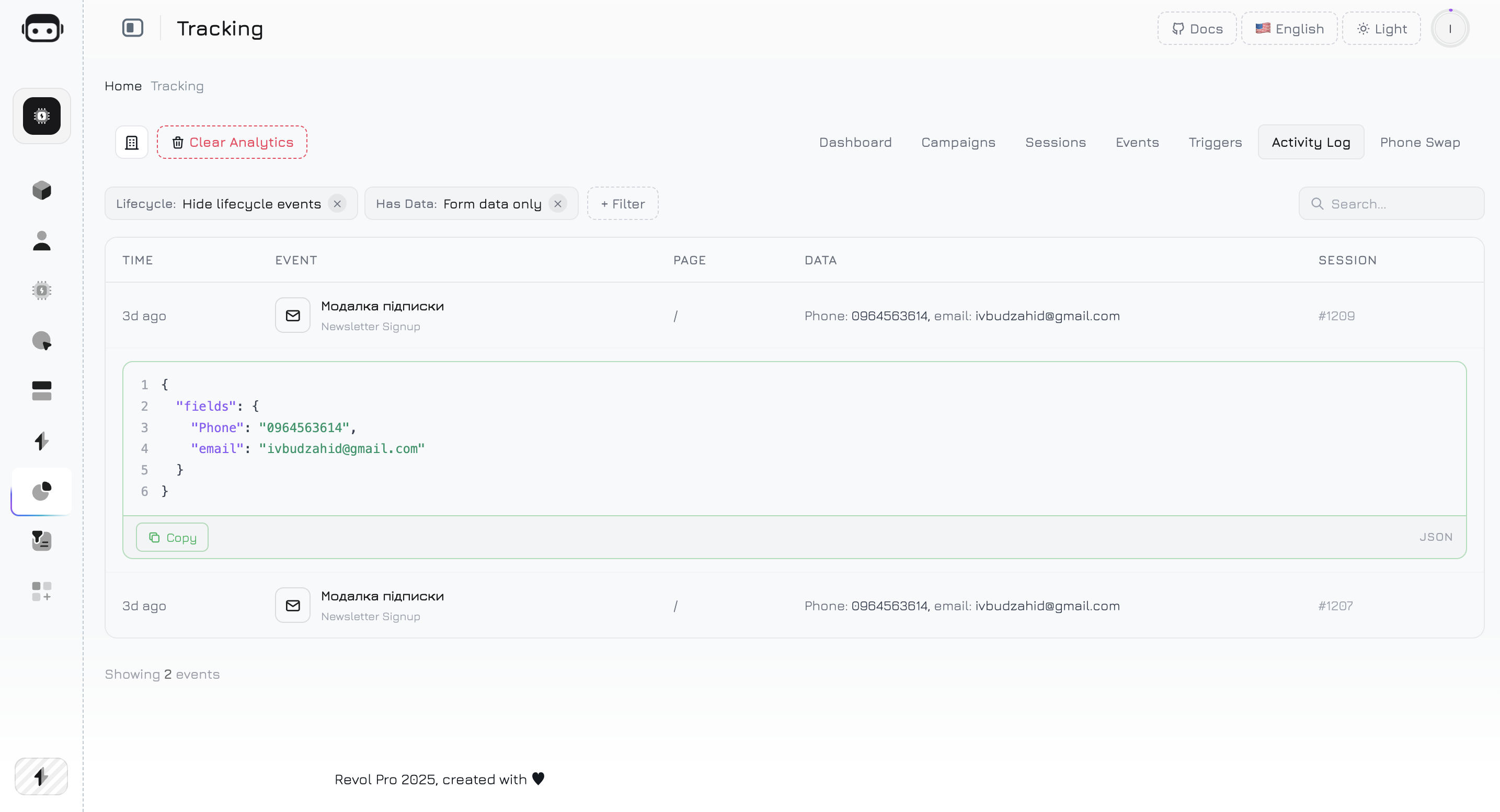
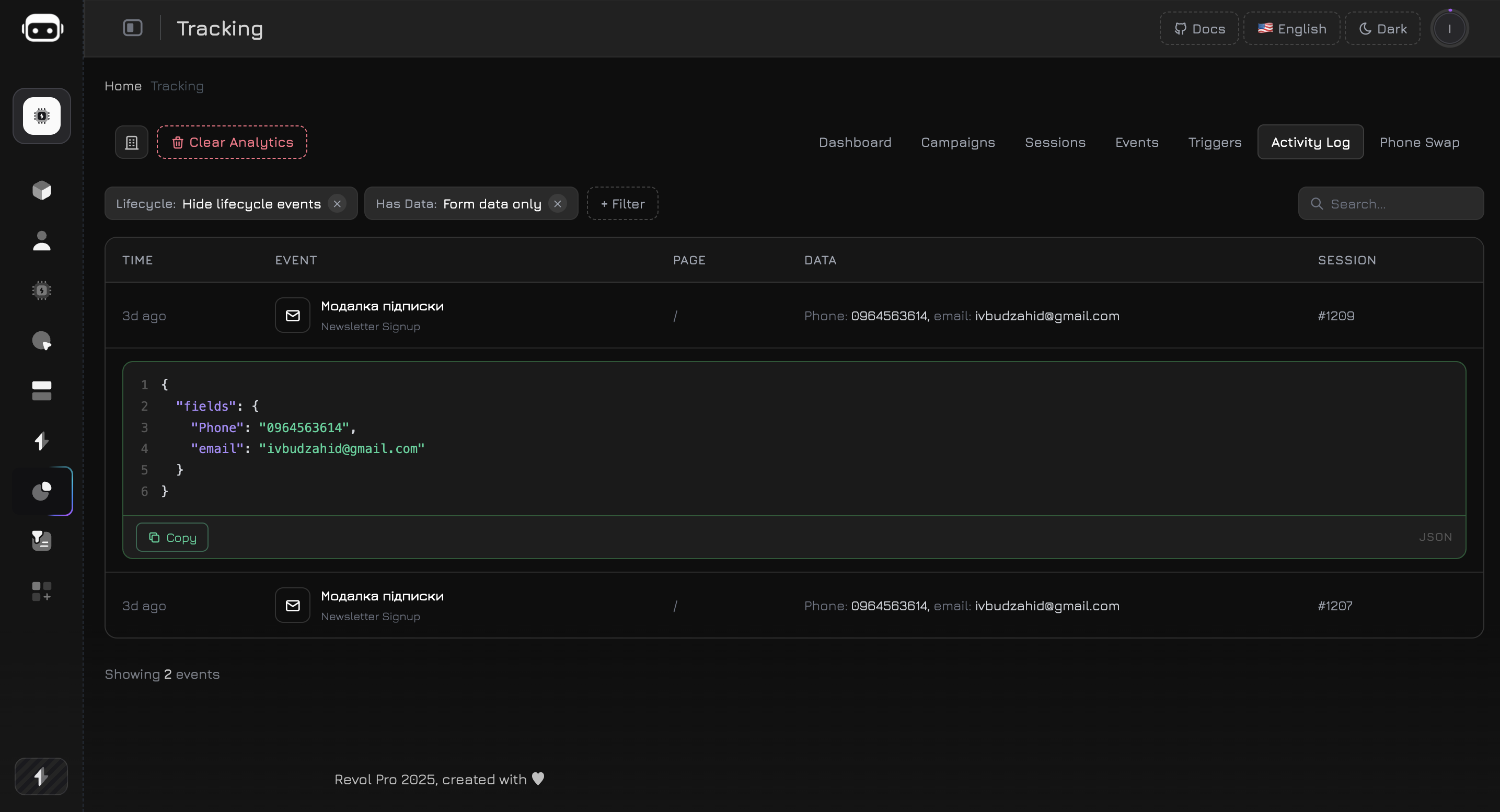
The Activity Log tab shows the most recent 500 tracking events captured on your website. Use it to monitor visitor interactions, debug event tracking, verify trigger activations, and inspect captured form data — all in one chronological feed.
 ***
## Events Table
Each row in the activity log represents a single tracked event:
| Column | Description |
| ----------- | ------------------------------------------------------------------------------------------------------------------------------------------ |
| **Time** | When the event occurred. Recent events show relative time (e.g., "5m ago"), older events show date and time. Hover for the full timestamp. |
| **Event** | Event icon and name. The name comes from the event definition (if linked), trigger name (if trigger-related), or the raw event type. |
| **Page** | The page URL where the event fired. Long URLs are truncated to 50 characters — hover to see the full path. |
| **Data** | Preview of event payload — shows the first 3 key-value pairs. If there are more, a "+N more" badge appears. Events with no data show "—". |
| **Session** | Session ID linking the event to a specific visitor session. |
The table displays **15 events per page** with pagination at the bottom.
***
## Event Types
The activity log captures several categories of events:
### Interaction Events
| Type | Icon | Description |
| ---------------- | -------- | ------------------------------------------------------------------------- |
| **click** | Pointer | Visitor clicked an element matching a CSS selector defined in your events |
| **scroll** | Arrows | Visitor scrolled past a tracked element (IntersectionObserver) |
| **form\_submit** | Document | Visitor submitted a form matching a CSS selector |
| **custom** | Code | Custom event fired via `RevolTracker.track()` from your JavaScript code |
### Trigger Events
| Type | Icon | Description |
| -------------------------- | --------- | ------------------------------------------------------------------ |
| **trigger\_shown** | Bell | A trigger was displayed to the visitor (modal, toast, or redirect) |
| **trigger\_clicked** | Cursor | Visitor clicked a button inside a trigger overlay |
| **trigger\_dismissed** | X | Visitor closed or dismissed a trigger overlay |
| **trigger\_promo\_copied** | Clipboard | Visitor copied a promo code from a trigger |
### Lifecycle Events
| Type | Icon | Description |
| -------------- | ---- | ------------------------------------------------ |
| **visibility** | Eye | A tracked element became visible in the viewport |
Lifecycle events (trigger\_shown, trigger\_dismissed, visibility) are **hidden by default** to reduce noise. Use the Lifecycle filter to show them.
***
## Filters
The activity log supports a flexible filter system. Click the **+ Filter** button to add filters. Active filters appear as removable chips above the table.
### Available Filters
| Filter | Type | Description |
| -------------- | ----------- | -------------------------------------------------------------------------------------------------------------------------------------------------------------------------------- |
| **Event Type** | Server-side | Show only events of a specific type: click, scroll, form\_submit, visibility, custom, or trigger |
| **Campaign** | Server-side | Show events only from sessions linked to a specific campaign. The dropdown is populated dynamically from your existing campaigns. |
| **Has Data** | Hybrid | Filter by event payload: **Any data** (events with payload), **No data** (events without payload), or **Form data only** (events containing form fields like email, phone, name) |
| **Lifecycle** | Client-side | Toggle visibility of lifecycle events (trigger\_shown, trigger\_dismissed, visibility). Hidden by default. |
| **Search** | Client-side | Free-text search across event type and page URL. Filters in real-time with a 200ms debounce. |
**Server-side filters** (Event Type, Campaign, Any data) trigger a full data reload from the server. **Client-side filters** (Lifecycle, No data, Form data, Search) filter the already-loaded data instantly — no network request needed.
### Filter Behavior
* Already-applied filters are disabled in the dropdown to prevent duplicates
* Each filter chip shows the filter name and selected value
* Click the **×** on a chip to remove the filter
* Filters can be combined — for example, show only `form_submit` events from a specific campaign that have form data
***
## Event Detail Panel
Click any event row that has data (the **Data** column shows key-value pairs instead of "—") to expand the detail panel below the row. The panel displays the full event payload as a **syntax-highlighted JSON block**.
### JSON Code Block
The expanded panel renders the complete `event_data` object with color-coded syntax:
| Element | Color | Example |
| --------------------------- | ------ | --------------------- |
| **Keys** | Purple | `"fields"`, `"email"` |
| **String values** | Green | `"john@example.com"` |
| **Numbers, booleans, null** | Orange | `42`, `true`, `null` |
### What Data Contains
The JSON payload varies by event type:
```json theme={null}
{
"selector": "#cta-button",
"text": "Get Started",
"x": 452,
"y": 320
}
```
Contains the CSS selector that matched, the element's text content, and click coordinates.
```json theme={null}
{
"fields": {
"email": "visitor@example.com",
"Phone": "0961234567",
"name": "John"
}
}
```
Contains captured form field values. Password and hidden fields are automatically excluded.
```json theme={null}
{
"product_id": "SKU-12345",
"product_name": "Running Shoes",
"price": 89.99,
"currency": "USD"
}
```
Contains whatever data was passed to `RevolTracker.track()`. Structure depends on your implementation.
```json theme={null}
{
"action_type": "modal"
}
```
Contains the trigger's action type (modal, toast, or redirect).
### Copy Button
Each JSON block has a **Copy** button in the bottom-right corner. Click it to copy the formatted JSON to your clipboard — useful for debugging, sharing with teammates, or importing data into other tools.
***
## Use Cases
After setting up a new click or form event, open the Activity Log and interact with the element on your website. The event should appear in the log within seconds. Check the Data column to verify the correct payload is captured.
Enable the **Lifecycle** filter to show `trigger_shown` events. Navigate your site with different conditions (UTM parameters, device types, scroll depths) to confirm triggers fire when expected.
Use the **Has Data → Form data only** filter to see all form submissions with captured field values. Expand each row to inspect the full payload — verify that the right fields are being captured and no sensitive data is leaking.
Select a specific campaign from the **Campaign** filter to see all events from visitors who arrived via that campaign. Useful for verifying that campaign attribution works correctly.
Find the event you need, expand the detail panel, and click **Copy** to grab the JSON payload. Paste it into a spreadsheet, Slack message, or support ticket for quick reference.
***
## Limits
* The activity log loads the **last 500 events** from the server. Older events are available through session-level event views.
* **Search** matches event type and page URL only — it does not search inside event data payloads.
* Events with no `event_data` cannot be expanded (the row is not clickable).
* Page navigation collapses any open detail panel.
***
## Events Table
Each row in the activity log represents a single tracked event:
| Column | Description |
| ----------- | ------------------------------------------------------------------------------------------------------------------------------------------ |
| **Time** | When the event occurred. Recent events show relative time (e.g., "5m ago"), older events show date and time. Hover for the full timestamp. |
| **Event** | Event icon and name. The name comes from the event definition (if linked), trigger name (if trigger-related), or the raw event type. |
| **Page** | The page URL where the event fired. Long URLs are truncated to 50 characters — hover to see the full path. |
| **Data** | Preview of event payload — shows the first 3 key-value pairs. If there are more, a "+N more" badge appears. Events with no data show "—". |
| **Session** | Session ID linking the event to a specific visitor session. |
The table displays **15 events per page** with pagination at the bottom.
***
## Event Types
The activity log captures several categories of events:
### Interaction Events
| Type | Icon | Description |
| ---------------- | -------- | ------------------------------------------------------------------------- |
| **click** | Pointer | Visitor clicked an element matching a CSS selector defined in your events |
| **scroll** | Arrows | Visitor scrolled past a tracked element (IntersectionObserver) |
| **form\_submit** | Document | Visitor submitted a form matching a CSS selector |
| **custom** | Code | Custom event fired via `RevolTracker.track()` from your JavaScript code |
### Trigger Events
| Type | Icon | Description |
| -------------------------- | --------- | ------------------------------------------------------------------ |
| **trigger\_shown** | Bell | A trigger was displayed to the visitor (modal, toast, or redirect) |
| **trigger\_clicked** | Cursor | Visitor clicked a button inside a trigger overlay |
| **trigger\_dismissed** | X | Visitor closed or dismissed a trigger overlay |
| **trigger\_promo\_copied** | Clipboard | Visitor copied a promo code from a trigger |
### Lifecycle Events
| Type | Icon | Description |
| -------------- | ---- | ------------------------------------------------ |
| **visibility** | Eye | A tracked element became visible in the viewport |
Lifecycle events (trigger\_shown, trigger\_dismissed, visibility) are **hidden by default** to reduce noise. Use the Lifecycle filter to show them.
***
## Filters
The activity log supports a flexible filter system. Click the **+ Filter** button to add filters. Active filters appear as removable chips above the table.
### Available Filters
| Filter | Type | Description |
| -------------- | ----------- | -------------------------------------------------------------------------------------------------------------------------------------------------------------------------------- |
| **Event Type** | Server-side | Show only events of a specific type: click, scroll, form\_submit, visibility, custom, or trigger |
| **Campaign** | Server-side | Show events only from sessions linked to a specific campaign. The dropdown is populated dynamically from your existing campaigns. |
| **Has Data** | Hybrid | Filter by event payload: **Any data** (events with payload), **No data** (events without payload), or **Form data only** (events containing form fields like email, phone, name) |
| **Lifecycle** | Client-side | Toggle visibility of lifecycle events (trigger\_shown, trigger\_dismissed, visibility). Hidden by default. |
| **Search** | Client-side | Free-text search across event type and page URL. Filters in real-time with a 200ms debounce. |
**Server-side filters** (Event Type, Campaign, Any data) trigger a full data reload from the server. **Client-side filters** (Lifecycle, No data, Form data, Search) filter the already-loaded data instantly — no network request needed.
### Filter Behavior
* Already-applied filters are disabled in the dropdown to prevent duplicates
* Each filter chip shows the filter name and selected value
* Click the **×** on a chip to remove the filter
* Filters can be combined — for example, show only `form_submit` events from a specific campaign that have form data
***
## Event Detail Panel
Click any event row that has data (the **Data** column shows key-value pairs instead of "—") to expand the detail panel below the row. The panel displays the full event payload as a **syntax-highlighted JSON block**.
### JSON Code Block
The expanded panel renders the complete `event_data` object with color-coded syntax:
| Element | Color | Example |
| --------------------------- | ------ | --------------------- |
| **Keys** | Purple | `"fields"`, `"email"` |
| **String values** | Green | `"john@example.com"` |
| **Numbers, booleans, null** | Orange | `42`, `true`, `null` |
### What Data Contains
The JSON payload varies by event type:
```json theme={null}
{
"selector": "#cta-button",
"text": "Get Started",
"x": 452,
"y": 320
}
```
Contains the CSS selector that matched, the element's text content, and click coordinates.
```json theme={null}
{
"fields": {
"email": "visitor@example.com",
"Phone": "0961234567",
"name": "John"
}
}
```
Contains captured form field values. Password and hidden fields are automatically excluded.
```json theme={null}
{
"product_id": "SKU-12345",
"product_name": "Running Shoes",
"price": 89.99,
"currency": "USD"
}
```
Contains whatever data was passed to `RevolTracker.track()`. Structure depends on your implementation.
```json theme={null}
{
"action_type": "modal"
}
```
Contains the trigger's action type (modal, toast, or redirect).
### Copy Button
Each JSON block has a **Copy** button in the bottom-right corner. Click it to copy the formatted JSON to your clipboard — useful for debugging, sharing with teammates, or importing data into other tools.
***
## Use Cases
After setting up a new click or form event, open the Activity Log and interact with the element on your website. The event should appear in the log within seconds. Check the Data column to verify the correct payload is captured.
Enable the **Lifecycle** filter to show `trigger_shown` events. Navigate your site with different conditions (UTM parameters, device types, scroll depths) to confirm triggers fire when expected.
Use the **Has Data → Form data only** filter to see all form submissions with captured field values. Expand each row to inspect the full payload — verify that the right fields are being captured and no sensitive data is leaking.
Select a specific campaign from the **Campaign** filter to see all events from visitors who arrived via that campaign. Useful for verifying that campaign attribution works correctly.
Find the event you need, expand the detail panel, and click **Copy** to grab the JSON payload. Paste it into a spreadsheet, Slack message, or support ticket for quick reference.
***
## Limits
* The activity log loads the **last 500 events** from the server. Older events are available through session-level event views.
* **Search** matches event type and page URL only — it does not search inside event data payloads.
* Events with no `event_data` cannot be expanded (the row is not clickable).
* Page navigation collapses any open detail panel.