> ## Documentation Index
> Fetch the complete documentation index at: https://revolai.mintlify.site/llms.txt
> Use this file to discover all available pages before exploring further.
# Tool Logs
> Monitor AI agent tool executions and channel events in real time
## Overview
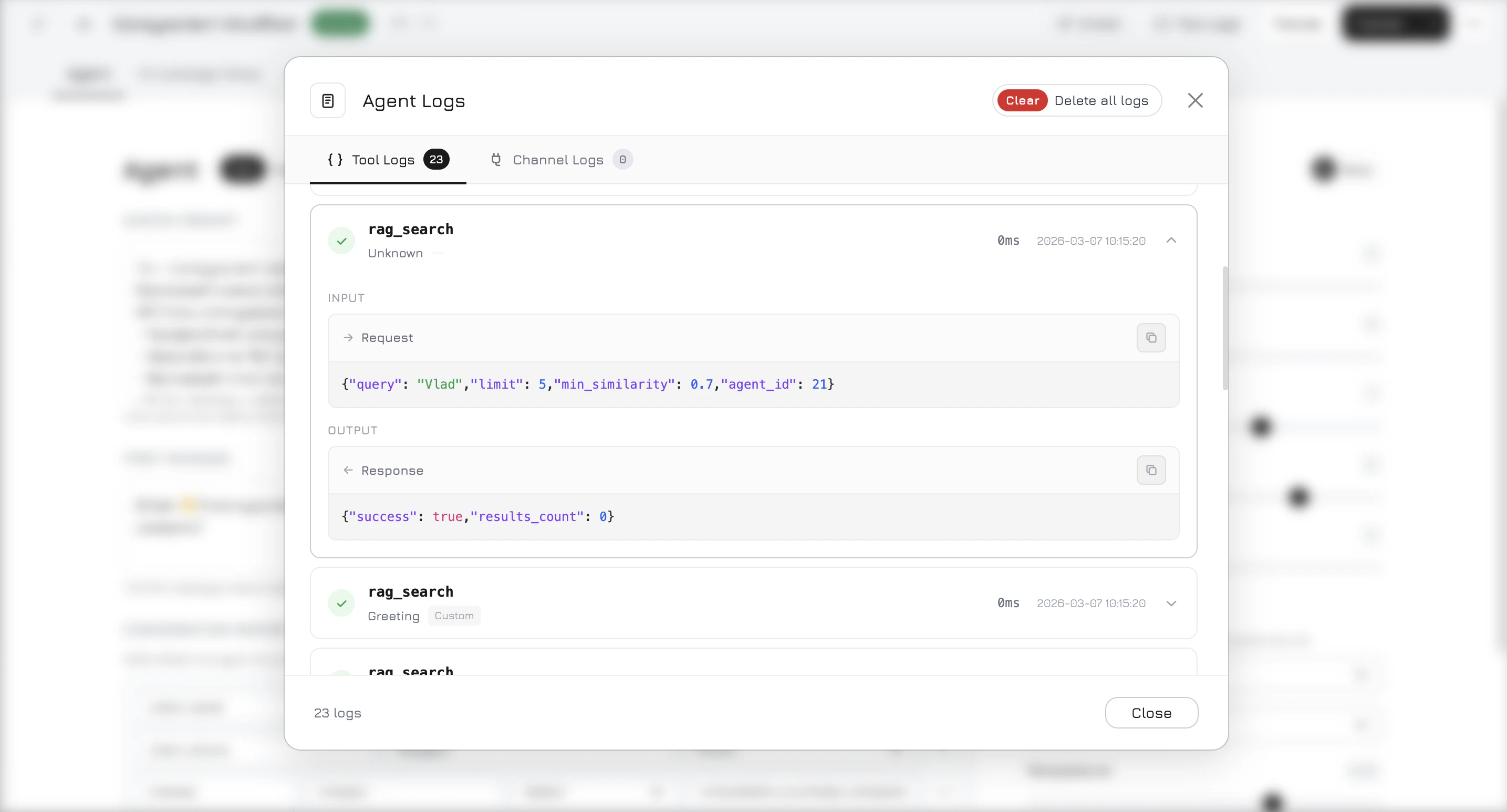
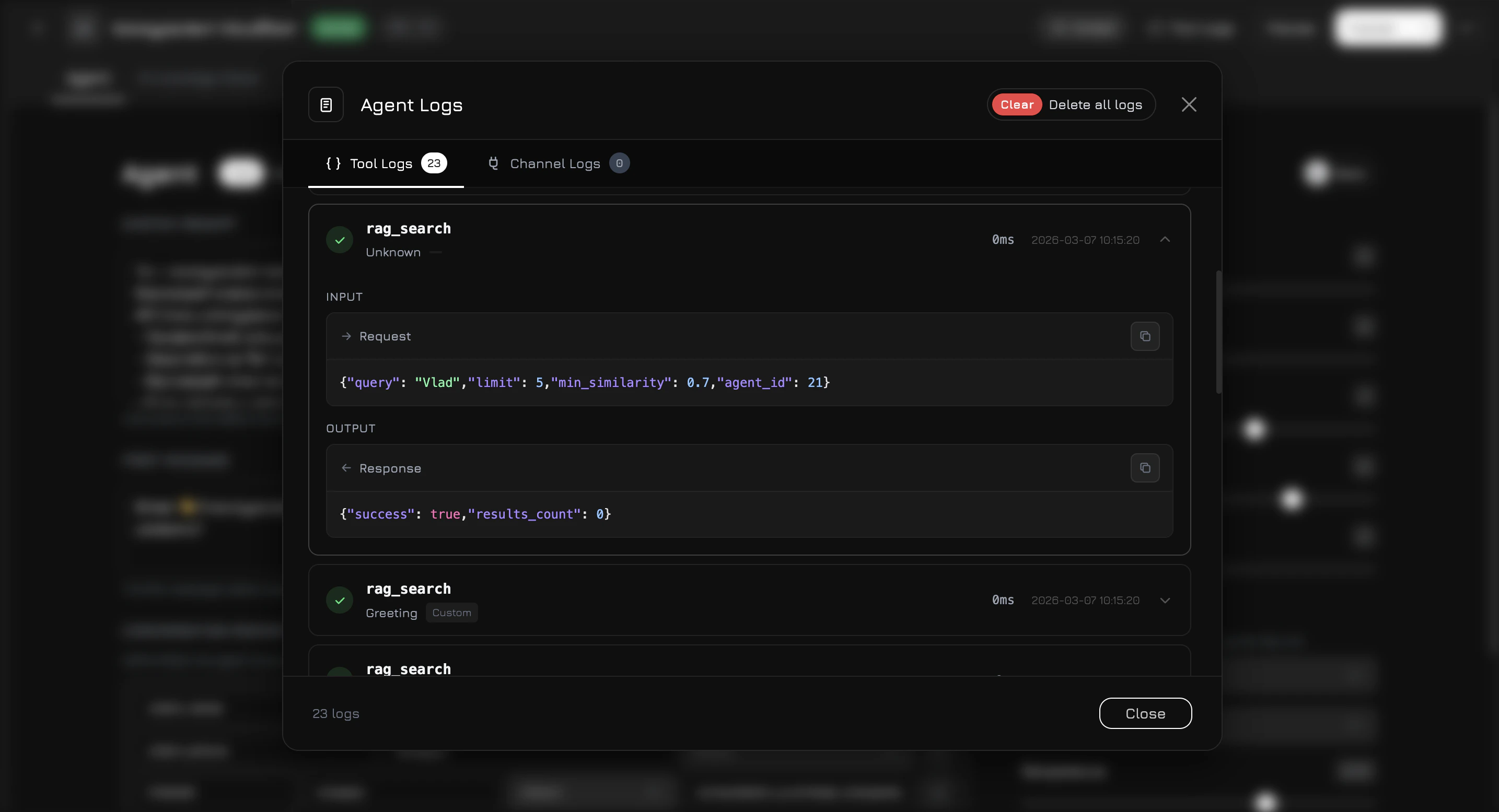
Tool Logs provide full visibility into what your AI agent does during conversations — every tool call, RAG search, and external channel event is recorded with input/output data, execution time, and status.
Open Tool Logs by clicking the **Tool Logs** button in the top-right corner of the agent editor modal.
 ## Two Tabs
The modal has two tabs:
### Tool Logs
Records every tool execution during AI conversations. Each entry shows:
| Field | Description |
| ------------------ | --------------------------------------------------------------------------------------------- |
| **Tool Name** | The function that was called (e.g. `rag_search`, `get_products`, `get_company_info`) |
| **Node Name** | Which workflow node triggered this tool |
| **Node Type** | Node category — Orchestrator, Product Agent, Media Agent, Company Agent, Formatter, or Custom |
| **Status** | `success`, `error`, or `no_results` |
| **Execution Time** | Duration in milliseconds |
| **Date** | When the tool was executed |
Click on any log entry to expand it and see the full **Input** (request parameters as JSON) and **Output** (response data as JSON). If the status is `error`, the error message is displayed at the top of the expanded section.
Tool logs are grouped by **rounds**. A round represents one LLM function-calling iteration — the AI may call multiple tools in a single round before generating a response. Round dividers help you understand the sequence of tool calls within a conversation turn.
### Channel Logs
Records events from external communication channels — webhooks, phone calls, messenger messages. Each entry shows:
| Field | Description |
| ---------------- | ------------------------------------------------------ |
| **Channel Type** | Widget, Phone, Telegram, WhatsApp, Instagram, etc. |
| **Direction** | `inbound` (received) or `outbound` (sent) |
| **External ID** | Caller or sender identifier from the external provider |
| **Status** | `success` or `error` |
| **Date** | When the event occurred |
Click to expand and view the full **Request Payload** (raw webhook data) and **Response** (what was sent back).
## What Gets Logged
Tool logs are created automatically whenever the agent:
* **Searches the knowledge base** — `rag_search` with the query and number of results found
* **Calls a function tool** — any tool configured in the agent's toolset (e.g. `get_products`, `get_documents`, `get_photos`, `get_videos`, `get_company_info`)
* **Executes integration tools** — Google Ads, Facebook Ads, and other connected service tools
Channel logs are created when:
* **An inbound webhook arrives** — phone call, messenger message, or any external channel event
* **An outbound message is sent** — the agent's response delivered through a channel
## Clearing Logs
Use the **Clear Logs** button (trash icon) at the top of the modal to delete all logs for the current agent. This action is irreversible.
Logs are stored in a partitioned database table for performance. High-volume agents may accumulate thousands of entries — use Clear Logs periodically to keep the interface responsive.
## Two Tabs
The modal has two tabs:
### Tool Logs
Records every tool execution during AI conversations. Each entry shows:
| Field | Description |
| ------------------ | --------------------------------------------------------------------------------------------- |
| **Tool Name** | The function that was called (e.g. `rag_search`, `get_products`, `get_company_info`) |
| **Node Name** | Which workflow node triggered this tool |
| **Node Type** | Node category — Orchestrator, Product Agent, Media Agent, Company Agent, Formatter, or Custom |
| **Status** | `success`, `error`, or `no_results` |
| **Execution Time** | Duration in milliseconds |
| **Date** | When the tool was executed |
Click on any log entry to expand it and see the full **Input** (request parameters as JSON) and **Output** (response data as JSON). If the status is `error`, the error message is displayed at the top of the expanded section.
Tool logs are grouped by **rounds**. A round represents one LLM function-calling iteration — the AI may call multiple tools in a single round before generating a response. Round dividers help you understand the sequence of tool calls within a conversation turn.
### Channel Logs
Records events from external communication channels — webhooks, phone calls, messenger messages. Each entry shows:
| Field | Description |
| ---------------- | ------------------------------------------------------ |
| **Channel Type** | Widget, Phone, Telegram, WhatsApp, Instagram, etc. |
| **Direction** | `inbound` (received) or `outbound` (sent) |
| **External ID** | Caller or sender identifier from the external provider |
| **Status** | `success` or `error` |
| **Date** | When the event occurred |
Click to expand and view the full **Request Payload** (raw webhook data) and **Response** (what was sent back).
## What Gets Logged
Tool logs are created automatically whenever the agent:
* **Searches the knowledge base** — `rag_search` with the query and number of results found
* **Calls a function tool** — any tool configured in the agent's toolset (e.g. `get_products`, `get_documents`, `get_photos`, `get_videos`, `get_company_info`)
* **Executes integration tools** — Google Ads, Facebook Ads, and other connected service tools
Channel logs are created when:
* **An inbound webhook arrives** — phone call, messenger message, or any external channel event
* **An outbound message is sent** — the agent's response delivered through a channel
## Clearing Logs
Use the **Clear Logs** button (trash icon) at the top of the modal to delete all logs for the current agent. This action is irreversible.
Logs are stored in a partitioned database table for performance. High-volume agents may accumulate thousands of entries — use Clear Logs periodically to keep the interface responsive.